Sunday, 8 February 2009

Bit Shifting in Clojure

Base64 encoding is a way of converting a stream of binary data into a printable form. The name comes from the 64 allowable characters ([a-z][A-Z][0-9]+/=) that are used.

The algorithm is very simple. Get 3 bytes at a time (if you can't, just pad with a character, typically =), munge them together (making 24 bits). We then split this 24 bits into 4 lots of 6 bits which allows us to pick one of the 64 allowable characters. This involves dealing with a few of the bit operators in Clojure, as shown below:


(def *encode-table*
"ABCDEFGHIJKLMNOPQRSTUVWXYZabcdefghijklmnopqrstuvwxyz0123456789+/=")

; Daft and way too slow
(defn encode-num
[num]
(let [a (bit-and num 63)
b (bit-shift-right (bit-and num 4032) 6)
c (bit-shift-right (bit-and num 258048) 12)
d (bit-shift-right (bit-and num 16515072) 18)]
(map (fn [x] (nth *encode-table* x )) (list d b c a))))

(defn str-pad [x size padchar]
(let [d (rem (count x) size)]
(if (zero? d)
x
(concat x (take (- size d) (repeat padchar))))))


(defn encode
"Lazily encode a sequence as base64"
[s]
(if (nil? s)
nil
(let [x (map int (str-pad (take 3 s) 3 \=))
num (+ (nth x 2) (* 256 (nth x 1)) (* 256 256 (first x)))]
(lazy-cat (encode-num num) (encode (drop 3 s))))))


The magic numbers in the bit-and allow us to select the right parts of the integer (63 is 111111, 4032 is 111111000000 and so on). This could be improved substantially with more bit-twiddling (see for example String Encoders).

One nice property of this is that by using lazy-cat we can deal with infinite sequences (just as long as you don't try and print the result!)


user> (apply str (take 10 (encode (range 0 1000000000000000000))))
"AEACAQwFBc"


In case you're wondering, I am really scraping the bottom of the barrel for little programming tasks to learn something new at the moment! I've ordered myself a copy of The Princeton Companion to Mathematics which'll hopefully provide more inspiration when it arrives.

(Update 24/2/2009) As Cubix pointed out, there's a bug in the code above as padding should be applied after encoding, not before. The full code is in the comments, but the main point is to change the code such that if we don't get three elements we don't do any encoding and instead use a helper function to do the last bytes. I'm sure there must be a further improvement as padding duplicates functionality in encode.


(defn encode
"Lazily encode a sequence as base64"
[s]
(if s
(let [x (map int (take 3 s))]
(if (= 3 (count x))
(let [num (+ (nth x 2) (* 256 (nth x 1)) (* 256 256 (first x)))]
(lazy-cat (encode-num num) (encode (drop 3 s))))
(padding x))))) ;;; helper function, see comments
Tuesday, 3 February 2009

Speeding up the Mandlebrot app

Previously I had some simple code for calculating the Mandelbrot fractal. Unfortunately, it was dog slow.

The primary reason is the use of BufferedImage. This is fine when you're loading an image from a file, but it's a big useless to go through a sequence setting each and every pixel with setRGB.

When you've already got all the data in memory, MemoryImageSource is a much better bet. You can create one with a 1D array of pixel data (with a specified width/height). MemoryImageSource implements the ImageProducer interface which means that any AWT derived component can use createImage to make an Image.

Firstly, I converted over the (x,y) set to just a list of numbers where (given the height and width) you can work out the corresponding pixel index, then I can just apply pmap (see also Ray Tracing)to calculate all the pixels in parallel.


(defn calculate-pixels []
(let [pixels (range 0 (* *width* *height*))]
(pmap (fn [p]
(let [row (rem p *width*) col (int (/ p *height*))]
(get-color (process-pixel (/ row (double *width*)) (/ col (double *height*))))))


Next we need the interop to go from my sequence of pixel values to an integer array.


(defn simple-mandlebrot [w h]
(let [x (int-array (calculate-pixels))]


int-array converts between a list of integers to a plain old Java array. I could probably use a Java Array for the whole thing, and not use seq, but I doubt this is an appreciable performance difference.

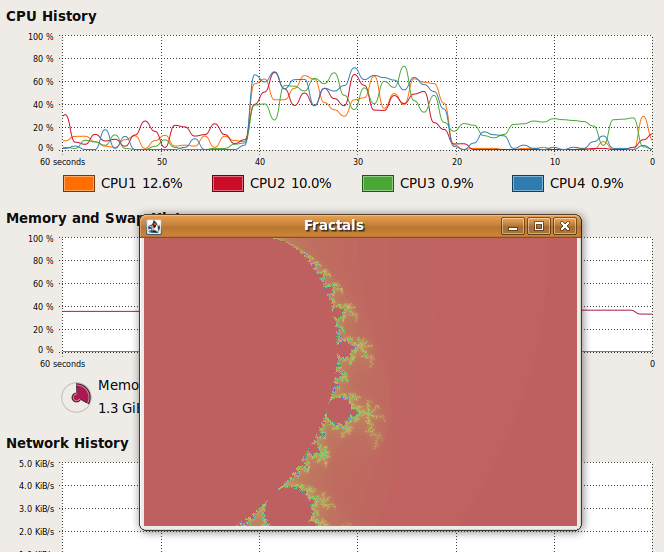
These changes have made a huge difference, instead of taking minutes to render a 512x512 image it takes a few seconds and all my CPU cores are occupied.

Speeding up Mandlebrot

Monday, 2 February 2009

Clojure Macros

Macros are one of the defining features of Lisp languages. A macro operates prior to compilation, allowing you to shape the code as you wish. Since Lisp code is homoiconic the macro language is the language.

Languages like C/C++ have macros, but they are in no way the same. You have a very limited language and you don't get the fine grained access to the code that you do with Lisp (since the code is just itself a Lisp data structure).

Pl Patterns tries to describe a taxonomy of macro use. One of the examples is debug printing with an example from the Arc language. Converted to Clojure this looks like this:


(defmacro dbg-prn
"Debugging form that prints out results"
[& more]
`(let [start# ~more]
(print '~more "==>" start# "\n")
start#))


defmacro defines a new macro with similar structure to defn The ` is used to create a template expression, where we can evaluate certain items within the expression by using macro characters (#,~,`,list-frag?). In this example we used start# to create a uniquely named value for the let expression and ~more to evaluate the parameters.

So now when I'm trying to debug code there's no more repetition of print x, return x I can just edit my function definition by adding dbg-prn (without the normal hardship of wrapping extra brackets around).


user> (dbg-prn + 1 2 3 4 5)
(+ 1 2 3 4 5) ==> 15 ;; printed to std-out
15

user> (dbg-prn + (* 2 3) (* 4 5))
(+ (* 2 3) (* 4 5)) ==> 26
26


You can use macroexpand-1 to expand out macros to see what they actually do:


user> (macroexpand-1 '(dbg-prn + 1 1))
(clojure.core/let [start__2150__auto__ (+ 1 1)]
(clojure.core/print (quote (+ 1 1)) "==>" start__2150__auto__ "\n")
start__2150__auto__)