Wednesday 11 January 2017

The Dark Path

Over the last few months I’ve dabbled in building in doing my accounts using a spreadsheet (Google Sheets and Excel). The similarities are so stark that I wonder if this isn’t a new trend in managing accounts. If so, it is a dark path.
Both tools have integrated some functional characteristics. For example, they both update automatically to reflect changes in values. This is a good thing, in general. 
My problem is that both tools have doubled down on automation. Both seem to be intent on forcing me to write references to every needed cell in the spreadsheet!
Now I don’t want you to think that I’m opposed to automation. I’m not. I use pen and paper, I use tools. I have a slight preference for pen and paper, but I'm using a spreadsheet too.
It’s not the fact that spreadsheets automate that has me concerned. Rather, it is the depth.
Previously, I'd created tables in Word. I can structure it so that it's correct; but I can also violate many of the "rules" whenever I need or want to. Word underlines some bits in green/red and throws up a few roadblocks; but not so many as to be obstructionist.
Google Sheets and Excel, on the other hand, are completely inflexible when it comes to their rules.  For example, in Google Sheets if I sum up a column then by God every thing in that column and all the dependent references have to be adorned by being a "number". There is no way, in this tool, to silently ignore me mistaking a string for a number!
Now, perhaps you think this is a good thing. Perhaps you think that there have been a lot of bugs in systems that have resulted from un-coerced numbers. Perhaps you think that that if you aren’t escorted, step by step, through the dependent cells it would be risky and error prone. And, of course, you would be right about that. 
The question is: Whose job is it to manage the "numbers". The tool? Or the pen and paper?
These so called "spreadsheets" are like the little Dutch boy sticking his fingers in the dike. Every time there’s a new kind of bug, we add a feature to prevent that kind of bug. And so these tools accumulate more and more fingers in holes in dikes. The problem is, eventually you run out of fingers and toes!
This is the wrong path!
Ask yourself why we are trying to plug defects with tools. The answer ought to be obvious. We are trying to plug these defects because these defects happen too often.
Now, ask yourself why these defects happen too often. If your answer is that our tools don’t prevent them, then I strongly suggest that you quit your job and never think about use a spreadsheet again; because errors are never the fault of our tools. Defects are the fault of users. It is users who create defects – not spreadsheets.
And what is it that programmers are supposed to do to prevent defects? I’ll give you one guess. Here are some hints. It’s a verb. It starts with a “T”. Yeah. You got it.TEST!
You test every number is indeed a number. You test that your formulas refer to actual elements; not empty cells. You test that you've recalculated everything!
Why are these spreadsheets adopting all these features?
We now have spreadsheets that force us to adorn every function, all the way up the dependent cells, with number. We now have spreadsheets that are so constraining, and so over-specified, that you have to specify all the elements that they refer to!
All these constraints, that these spreadsheets are imposing, presume that the user has perfect knowledge of the system; before the system is written. They presume that you know which number is a number. They presume you know to not to mix different units. They presume you know which input should link to which output. They presume you know what units a result will come back in.
And because of all this presumption, they punish you when you are wrong. 
And how do you avoid being punished? There are two ways. One that works; and one that doesn’t. The one that doesn’t work is to design everything up front before starting. The one that does avoid the punishment is to override all the safeties.
And so, you write everything on paper and you leave these so called "spreadsheets" alone.
Why did the nuclear plant at Chernobyl catch fire, melt down, destroy a small city, and leave a large area uninhabitable? They overrode all the safeties. So don’t depend on safeties to prevent catastrophes. Instead, you’d better get used to writing lots and lots of tests, no matter what spreadsheet you are using!
--
Of course, this is just early morning unfunny parody of an article by Bob Martin, The Dark Path.
I strong disagree with the sentiment expressed in the article. Types are a tool that help you write code safely. Tests are a tool that help you write code safely. Neither replaces the other. 
To suggest that we should abandon static-typing is wrong. If I change something returning type A to returning type B I can see how that might mean I have to change a lot of my code base. That doesn't mean static typing is bad, it could mean anything! 
  • Maybe the design sucks, why does so much of the code know about type A?
  • Maybe it's a good thing - you didn't know everything upfront, an assumption has changed, so you should change the code?
  • Maybe you want to experiment? We should find a way to defer type errors to runtime? 
  • Maybe we should invest in tooling to make this problem more tractable? (Jackpot!?)

We, as software engineers, should be actively looking to advance the state of the art. We should be building tools to support our ways of working, not rallying against those that do.




Radical Focus - OKRs

Radical Focus explains the OKR process with a business narrative (a startup building the StarBucks of Coffee). The story shows how focusing on OKRs supports the team taking the tough decisions (e.g. stopping promising work if it doesn't support an objective) and spending their limited runway of activity on the right tasks.


It's a short read, with some good points but having read the book and watched "The Executioners Tale" (https://vimeo.com/86392023) I'd pick the video next time!

Key takeaways

  • OKRs are great for setting goals, BUT without a system to achieve them you are as likely to fail as with anything else.
  • A mission keeps you on the rails - the OKRs provide focus and milestones.
  • Set only one OKR for the company - it's about focus
  • Timescales should be about 3 months - too long and it's too far away to have impact, and too short and it's not bold enough
  • Objectives are inspirational not metrics
  • Repeat the message. The goal needs to be in front of everyones mind and tied to all activities. - "When you are tired of saying it, people are starting to hear it" (Jeff Weiner, CEO of LinkedIn")
  • Heuristic for KRs - one usage metric, a revenue metric and a satisfaction metric.
  • A good key result should be a bit scary - a 50/50 confidence you can make it is about right.
  • Use health metrics to identify areas to protect as you meet the goals (what can't you screw up?)
  • Use the four-square template (http://www.tightship.io/assets/weekly-meeting.jpg) to keep focus
  • Reinforce the message at the beginning and end of the week (Monday discuss/challenge, Friday demonstrate/celebrate)

Tuesday 3 January 2017

The 3X Approach

I watched a webinar recently about Kent Beck's characterization of product development as a triathlon and thought I'd summarize the notes here!

Kent presents product development as a three-phased approach (eXplore, eXpand, eXtract). This really closely models the product life cycle (from HBR).


Kent's insight is that you should act differently depending on the phase you are in.

In the Explore phase (stage #1 above) you can't predict the future. You've no idea how long finding market fit is going to take. It's a high risk activity. The main driver of success is the rate at which you can run experiments and learn quickly. At this stage software quality is irrelevant - the half-life of the code is short. You want a cross-functional, loosely co-ordinated team to deliver this phase.

The next stage is Expand - this is rapid growth, equivalent to the B round of venture capital. You have validated the market, you know what to do and how to do it. Time to scale, develop features and get it in the hands of users and build those feedback cycles.

Finally, you are at Extract. This is where economies of scale shine. Work here is predictable - adding a feature will result in a known about of revenue. You can estimate things well because you've done it plenty of times before. Quality is really important - cutting corners now will cost you because you'll be stuck with it for ever.

Organizations can get tuned to a particular way of thinking and that can constrain. For example, it's easiest to get tuned into the last phase Extract (see Innovator's Dilemma)

Beck states that this is one of the things XP got wrong-  there is no one-size fits all methodology. The 3X model says it's all about where you are on the s-curve.

Wednesday 31 August 2016

Design Pattern Haikus

Singletons

a singleton is
a global variable
sounds a bit better 

A singleton is just a fancy name for a global variable. I like to think of a singleton as a way of warping to another point in space/time, changing the space time continuum and then heading back. You've seen the sci-fi films where this happens, right? It has similar effects on your code, making it difficult to understand what the hell is happening.

Interpreter

interpreter is
domain specific language
that is all it is

Well, there's not much more to say is there? You want your code to be readable in the language of your domain. One way to do this is to make the code look more like the language of your domain. A domain-specific language is one way to accomplish this.

Visitor

multiple dispatch
that is what you really wanted
visitor will do

You've got a function that wants to do different things depending on the types of the arguments. You've got a language that only allows you to do one different thing via polymorphism. You don't want type-switching cos someone told you that was bad.

Assuming you've got those prerequisites then go for the visitor pattern. Alternatively, look at multiple dispatch and see there's no problem there at all really.

Strategy 

functions compose well
classes do not compose at all
love strategy pattern

You want to break apart a set of work into small discrete components (let's call them "objects"). The strategy pattern allows you to plug these together to solve a problem.

Or... You want to break apart an algorithm into discrete functions (let's call them functions). Functions glue together.

Wednesday 11 May 2016

Professionalism in Software Engineering

Yesterday, I attended a talk by Bob Martin on Professionalism in Code hosted by Software East at Redgate. I also spent considerable time beforehand working out whether it'd be unfair to introduce Bob as the "Donald Trump of Computer Programming". Sanity prevailed and I didn't. But I just wrote it up there, didn't I? D'oh.

Is the software engineering industry professional? As software engineering professionals we should have skill and good judgement. Does the software engineering industry have that?

Bob gave the famous example [PDF] of Knight Capital and Volkswagen, but there's many more (Therac-25, the F35 and The Chaos Report [PDF]). You could argue that the software industry is in meltdown and developer incompetence / poor judgement has cost the industry billions. I think you'd have a pretty convincing case! Or would you? There was no mention the other side - the tremendous advantages our haphazard industry has made to almost the whole planet (the Internet, mobile phones, communication).

Bob painted the nightmare scenario - regulation. Imagine some time from now, some bug somewhere (a missing ; even) results in a number of deaths. The nuclear reactor blows, the self-driving cars go made on a leap year and start running people over, the planes turn upside down when crossing the equator (etc). The natural result of this is the Government blames us (software developers) and starts to put some regulations in place. Again, this feels believable-ish.

But why hasn't it happened yet? Well, safety-critical systems are pretty regulated. See this lump [PDF trigger warning] from the FAA about how they do things. I'm not going to argue it's perfect, but it's demonstrably good enough to stop null pointers making things fall out the sky regularly.

So what should we do to prevent this threat of regulation? Well, we should:
  • Not ship shit!
  • Give reasonable estimates!
  • QA should find no bugs
  • Software should get better, not worse
  • Invest 20 hours per week in personal development
Most of this stuff is easy to agree. Of course we shouldn't ship shit - are you insane? Of course we should strive to write bug free code. If you want to explore these ideas more, Bob's book (The Clean Coder) covers the topics in much greater detail. It was a great talk and got the audience thinking.

Are these the right things to make the industry professional? Maybe. Maybe as an industry we should look at other areas:
There's a huge space for software engineers to explore about building professional quality software. We're not explored much yet. I'm certainly no historian, but I'd imagine professions like Medicine, Law and Engineering took more than 60 or so years to establish what good looked like.

The deliciously chaotic world of software engineering is going to continue for a while yet!


Monday 4 April 2016

Azure Platform Services

Last time around we compiled a large compendium of links detailing Azure Infrastructure services. In this post, we'll compile an even larger set of links detailing Azure's Platform Services (PaaS rather than IaaS).

The breadth of services that Azure offers is pretty overwhelming, so take a deep breath :)

Cloud Compute

Azure Cloud Services allows you to create a compute service (ASP.NET, Python, node and PHP are all supported). This might be a worker role (e.g. a background tasks) or a web role (e.g. simple requests to display data). Cloud Services gives you the ability to scale these horizontally as needed.

Azure Batch runs your large scale parallel tasks and big batch processing jobs. Azure scales these as needed.

Azure Service Fabric is an orchestration layer for micro-service based deployments. It was borne out of internal use at Microsoft used to develop Azure itself.

Azure RemoteApp is a bridging technology (similar to Citrix type things) allowing you to access your application anywhere.

Web and Mobile

Web App Service allows you to deploy web applications in languages like C#, node.js and Python. It's now part of the more general Azure App Service.

API App Service allows you to deploy secured API services and generate appropriate clients to access them.

API Management Service lets you "take any API and publish a service in minutes". More specifically you get monitoring, RESTful and JSON-ful support and the ability to combine multiple back-ends into a single API endpoint.

Mobile App Service gives you an API specifically for mobiles, including support for off-line sync.

Logic App Service lets you integrate business processes and workflows visually. It's goal is to make it easy for you to join your data from on-premise to cloud-based workflows.

Notification Hubs provide scalable push-notifications to all major platforms (including iOS and Android).

Data

SQL Database provides a fully managed PaaS version of SQL Server with advanced features such as an index advisor (monitoring your workload to see access patterns that would benefit from an index).

SQL Data Warehouse is a data warehouse that can scale to huge volumes of data (pricing is based separately on Compute and Storage use).

Redis Cache is the PaaS version of Redis, an in-memory data structure store.

DocumentDB is a store for JSON documents. As of Build 2016, it was announced that there is a MongoDB compatibility layer (see here).

Azure Search provides a fully managed search service (with Lucene query compatibility).

Azure Table Storage provides you with a key-value store aimed at large schema-less documents.

Analytics and IoT

HDInsight is a managed Apache Hadoop (map/reduce), Spark, R, HBase and Storm service made "easy".

Azure Machine Learning is a set of machine-learning API's, allowing you to applying advanced analytics to a wide source of data (pictures, people, text etc.). As of Build 2016, this seems to be in the process of being rebadged "cognitive services".

Azure Stream Analytics gives you the ability to do real time processing of streaming data from huge numbers of sources.

Azure Data Factory is a set of data orchestration API's, allowing you to mangle data from different sources together (with tools for data lineage, ETL and so on).

Azure Event Hubs is a scalable pub-sub service for aggregating events from many sources.

Mobile Engagement is a set of API's for monitoring and understanding app usage on mobile devices.

Friday 1 April 2016

Azure Infrastructure Services


Azure “is a growing collection of integrated cloud services for moving faster, achieving more, and saving money”. Well, that’s the marketing lingo, but what are the actual services available?


The diagram above, from here, is the best example I've seen of capturing everything that Azure is and the services that it offers.

Let's start with the infrastructure services.

Infrastructure services (IaaS) abstract away physical machines to services that can be molded via code rather than plugging in cables.

Under the banner of Compute, there are a couple of services. Azure Virtual machines let you deploy images in any way. They aren't just limited to Windows, support includes Linux, Oracle IBM and SAP. Azure Container Service allows you to deploy containers to Azure. This is heavily open-source friendly and allows you to use Apache Mesos or Docker Swarm to orchestrate.

There's many options for file storage as a service. Azure Blob Storage provides a service for storing large amounts of unstructured data that can be accessed via http(s). A blob account has multiple containers (think of these are folders or organizational units) and each container can lumps of data (blocks, append-only, page blobs). Azure Files provides fully managed file shares using the standard SMB protocol. This allows you to migrate file shared-based applications to the cloud with no changes. Finally in the storage offerings there are a variety of low-latency and high throughput storages referred to as premium storage. These are essentially pre-configured virtual machines with optimized technology (e.g. SSD) for storage. Options include hosting SQL Server, Oracle, MySQL, Redis and MongoDB.

There's a whole raft of networking services. Azure Virtual Network provides an environment to run your machines and applications where you can control the subnets, access control policies and more. Azure Load Balancer does exactly what it says on the tin - it's a Layer 4 load balancer that allows you to distribute incoming traffic. Azure DNS is another Ronseal service! ExpressRoute lets you create private connections between your data center and Azure data centers (giving you up to 10 Gbps). Traffic Manager is similar to load balancing, but with more flexibility around failover, A/B testing and combining Azure / on-prem systems. Azure VPN Gateways is another virtual network manager, and Application Gateway is an application level load balancer. 

Confused yet?


Monday 18 January 2016

Evolutionary Design Reading List

Evolving a shared library with an API in flux is a tough problem, but there’s plenty of principles, practices and patterns around this.


Parallel Change - Parallel change, also known as expand and contract is a pattern to implement backward-incompatible changes to an interface in a safe manner by breaking the change into three distinct phases: expand, migrate, and contract.

Postel’s Principle - Be conservative in what you send; be liberal in what you accept.

Refactoring Module Dependencies - Some patterns for refactoring module dependencies

Package Management Principles - Principles of packages (REP, CCP, CRP, ADP, SDP, SAP).  Think of these as a higher-level version of SOLID.

Strangler Application - A metaphor describing growing a new system around the edges of old.

Asset Capture - A strategy for migrating between a strangler application and back again.

On the Criteria to be used in Decomposing Systems into Modules - Parnas’ classic paper on modular systems (referenced by Tim in his recent talk).

Escape Integration Test Syrup - Talk from Agile on the Beach about testing and rapidly changing dependencies.

Semantic Versioning - For completeness!

Monday 9 November 2015

The (very) Basics of R with the Game of Life

R is a programming language for statistical computing and graphics.  It's also the language of choice amongst pirates.  Arrr! R is increasingly important for big data analysis, and both Oracle and Microsoft have recently announced support for database analytics using R.

So, how do you get started with R?  Well, for the rest of this I'm going to assume that you already know how to program in a { } language like Java / C# and I'm going to cover the minimum amount possible to do something vaguely useful. The first step is to download the environment.  You can get this from here.  Once you've got something downloaded and installed you should be able to bring up a terminal and start R.  I really like the built in demos.  Bring up a list of them with demo() and type demo(graphics) to get an idea of the capabilities of R.

These are the boring syntax bits:
  • R is a case sensitive language
  • Comments start with # and run to the end of the line
  • Functions are called with parentheses e.g. f(x,y,z)
The "standard library" of R is called the R Base Package. When you bring up R, you bring up a workspace.  A workspace is just what is in scope as any one time.  You can examine the workspace by calling the ls function.

    # Initially my workspace is empty
    > ls()
    character(0)

    # Now I set a value and lo-and-behold, it's in my workspace
    > x = "banana"
    > ls()
    [1] "x"

    # I can save my workspace with
    > save(file="~/foo.RData");

    # I can load my workspace with
    > load("~/foo.RData");

    # I can remove elements from the workspace with rm
    > rm(x)
    > ls()
    character(0)

    # I can nuke my workspace with rm(list=ls())
    > x = 'banana'
    > rm(list=ls())
    > ls()
    character(0)   

We've seen above that R supports string data, but it also supports vectors, lists, arrays, matrices, tables and data frames. To define a vector you use the c function.  For example:


    > x = c(1,2,3,4,5)
    [1] 1 2 3 4 5

    > length(x)
    [1] 5

Remember everything in a vector must be of the same type.  Elements are co-erced to the same type, so c(1,'1',TRUE) results in a vector of string types.  Indexing into vectors starts at 1 (not zero).  You can use Python style list selection:

    > x = c(1,2,3,4,5,6,7,8,9,10)
    >  x[7:10] # select 7 thru 10
    [1]  7  8  9 10
    > x[-(1:3)] # - does exclusion
    [1]  4  5  6  7  8  9 10

To define a list, you use, ahem, list.  Items in list are named components (see the rules of variable naming).

    > y = list(name="Fred", lastname="Bloggs", age=21)
    > y
    $name
    [1] "Fred"
    $lastname
    [1] "Bloggs"
    $age
    [1] 21
    > y$name # access the name property
    [1] "Fred"

Finally, let's look at matrices.  You construct them with matrix and pass in a vector to construct from, together with the size.

  > m = matrix( c(1,2,3,4,5,6,7,8,9), nrow=3, ncol=3)
  > m
           [,1] [,2] [,3]
    [1,]    1    4    7
    [2,]    2    5    8
    [3,]    3    6    9

OK, that should be enough boring information out the way to let me write a function for the Game of Life.  All I want to do is take a matrix in, apply the update rules, and return a new one.  How hard can that be? You write R files with the extension ".R" and bring them into your workspace with the source function. Here's an embarrassingly poor go at the Game of Life (note I've only spent 5 minutes with the language, so if you've got any improvements to suggest or more idiomatic ways of doing the same thing, they are greatly received!).


Testing this at the REPL with a simple pattern.

    > blinker = matrix(0,5,5)
    > blinker[3,2:4]=1
    > blinker
         [,1] [,2] [,3] [,4] [,5]
    [1,]    0    0    0    0    0
    [2,]    0    0    0    0    0
    [3,]    0    1    1    1    0
    [4,]    0    0    0    0    0
    [5,]    0    0    0    0    0
    > nextStep(blinker)
         [,1] [,2] [,3] [,4] [,5]
    [1,]    0    0    0    0    0
    [2,]    0    0    1    0    0
    [3,]    0    0    1    0    0
    [4,]    0    0    1    0    0
    [5,]    0    0    0    0    0

Huzzah! Next steps are probably to write some unit tests [PDF] around it, but learning how to install packages can wait till another day!

Saturday 17 October 2015

Mindless TDD

In this post, I look at a common misinterpretation of TDD I often see at coding dojos/katas.

A quick refresher - TDD is simple, but not easy.

  1. Write a failing test
  2. Write the minimum code to make test pass
  3. Refactor

You have to think at each step.  This is often overlooked, and TDD portrayed as series of mindless steps (if that were true, developers probably wouldn't get paid so well!).

Let's take the Bowling Kata as an example of how easy it is to fall into mindless steps.  What's the right test to do first?

    [Test]
    public void PinExists() {
      Assert.That(new Pin(), IsStanding, Is.True);
    }

We're bound to need a Pin class right?  And we should definitely check whether it's standing up or falling down.  We continue in this vein, and create a Pin that can be knocked down and stood up.  Everything proceeds swimmingly. 15 - 20 minutes have elapsed and we have a unit tested equivalent of bool that's no use to anyone.

I've seen similar anti-patterns in the Game of Life kata.  We write some tests for a cell, and the rules (three live neighbours means alive and so on).  We use this to drive a Cell class and we add methods to change the state depending on the number of neighbours.  Some time passes, and then we realize we actually want a grid of these objects, and they change state based on their neighbours state and we're in a bit of a pickle.  Our first guess at an implementation has given us a big problem.

If we somehow manage to solve the problem from this state, we end up with a load of tests that are coupled to the implementation.  Worse, because we've ended up creating lots of classes, we start prematurely applying SOLID, breaking down things into even more waffly collections of useless objects with no coherent basis.  Unsurprisingly, it's difficult to see the value in test-driven development when practiced like this.

So what's the common problem in both these cases?

Uncle Bob has described this behaviour Slide 9 of the Bowling Kata PPT describes a similar problem, but attributes it to over-design and suggests TDD as the solution.  I agree, but I think some people pervert TDD to mean test-driven development of my supposed solution, rather than TDD of the problem itself.

The common problem is simple.  Not starting with the end in mind!

If we'd have started the Bowling Kata from the outside-in, our first test might have simply bowled 10 gutter balls and verified we return a zero.    We could already ship this to (really) terrible bowlers and it'd work!

Maybe next we could ensure that if we didn't bowl any spares/strikes it'd sum the scores up.  Again, now we can ship this to a wider audience.  Next up, let's solve spares, then strikes and at each stage we can ship!

Each time around the TDD loop we should have solved more of the problem and be closer to fully solving it.  TDD should be continuous delivery, if the first test isn't solving the problem for a simple case it's probably not the right test.

Similarly for the Game of Life, instead of starting from a supposed solution of a cell class, what happens if your first test is just evolving a grid full of dead cells?  What happens if we add the rules one at a time?  You can ship every test once you've added the boilerplate of the "null" case.

TDD isn't about testing your possible implementation on the way to solving the problem, it's about writing relevant tests first and driving the implementation from that.  Start from the problem!

TDD done right is vicious - it's a series of surgical strikes (tests) aimed at getting you to solve the problem with the minimum amount of code possible.

Tuesday 31 March 2015

Anatomy of a class.

Do you ever view a class and get filled with a sense of dread?  I did today, so I thought a good old-fashioned rant was in order.

I opened up a class today and was greeted with this.   First off, don't worry, I made the Wibble up.  Secondly, if wibble was the first thing you noticed we're probably in trouble.


    public sealed class MultiWibbledEntitiesDataPresenterFactory<TDetectionContext, TWibbledEntity, TProvider> : BasicFactory<Unit, IDataPresenter<MultiWibbledEntitiesContext<TDetectionContext, TWibbledEntity>>>
        where TWibbledEntity : WibbledEntity
        where TProvider : IProvider<TWibbledEntity>
    {
        private readonly IUtcDateTimeProvider m_UtcDateTimeProvider;
        private readonly ILocalDateTimeProvider m_LocalDateTimeProvider;
        private readonly IWibbledEntityDetector<TDetectionContext> m_WibbledEntityDetector;
        private readonly IFactory<TWibbledEntity, TProvider> m_ProviderFactory;
        private readonly IFactory<TWibbledEntity, IDataPresenter<SingleWibbledEntityContext<TWibbledEntity, TProvider>>> m_RawWibbledEntityDataPresenterFactory;
        private readonly Func<IUtcDateTimeProvider, string, IStatusLogger> m_StatusLoggerBuilder;

        public MultiWibbledEntitiesDataPresenterFactory(
            IUtcDateTimeProvider utcDateTimeProvider,
            ILocalDateTimeProvider localDateTimeProvider,
            IWibbledEntityDetector<TDetectionContext> wibbledEntityDetector,
            IFactory<TWibbledEntity, TProvider> providerFactory,
            IFactory<TWibbledEntity, IDataPresenter<SingleWibbledEntityContext<TWibbledEntity, TProvider>>> rawWibbledEntityDataPresenterFactory,
            Func<IUtcDateTimeProvider, string, IStatusLogger> statusLoggerBuilder
            )
        {
            m_UtcDateTimeProvider = utcDateTimeProvider;
            m_LocalDateTimeProvider = localDateTimeProvider;
            m_WibbledEntityDetector = wibbledEntityDetector;
            m_ProviderFactory = providerFactory;
            m_RawWibbledEntityDataPresenterFactory = rawWibbledEntityDataPresenterFactory;
            m_StatusLoggerBuilder = statusLoggerBuilder;
        }

        protected override IDataPresenter<MultiWibbledEntitiesContext<TDetectionContext, TWibbledEntity>> ConstructItem(Unit key)
        {
            return new MultiWibbledEntitiesDataPresenter<TDetectionContext, TWibbledEntity, TProvider>(
                m_UtcDateTimeProvider,
                m_LocalDateTimeProvider,
                m_WibbledEntityDetector,
                m_ProviderFactory,
                m_RawWibbledEntityDataPresenterFactory,
                m_StatusLoggerBuilder
                );
        }
    }


OK, you've read through that.  You've probably died a little inside. What did you learn?  Well, this is a MultiWibbledEntitiesDataPresentorFactory.

What the actual fuck?

A multi wibbled entities data presenter factory.

Spacing it out doesn't help much either.  It's a factory that makes data presenters for multi wibbled things.  OK, that starts to make some sense.  I guess I'd use this class if ever I needed to make a multi-wibbled-entities-data-presenter-factory.

Let's say that's the case. How do I construct one of these factory things?  I need a couple of time providers (UTC and local time, just in case), a detector (no idea what that is), two more factories and a function called "statusLoggerBuilder".  And this is just to create an object (albeit a rather complicated multi-wibbled data presenter object).

What can you do with the class?  Not a lot, there aren't any public methods other than the constructor, and that's pretty boring.  So, in order to make any progress, you'll have to explore a few more classes.  You'll need to visit the "BasicFactory".  You'll need to look at Unit, IDataPresenter and a few more parameterized classes.  In order to work out what this does, I've got to read all these files.

What's with all the generics?  Does this tell me the original developer was a template meta-programming C++ person?  Why all the complexity?

How many files do I need to open in order to understand this class?

What problem is this class solving?  The code doesn't tell me this, there aren't any comments and there aren't any tests.  The only way for me to understand this code is to navigate all the code's friends and work out what each of them do.

But on the plus side, I can create one and test it, so it must be good right?

Monday 19 January 2015

The Diamond Square Algorithm

Ever wondered how to generate a landscape?  I've been fascinated by these since the days of Vista Pro on my trusty Amiga.

The diamond-square algorithm is a method for generating heightmaps.  It's a great algorithm because it's amazingly simple and produces something very visual (similar to the emergent behaviour exhibited by the flocking algorithm.  My kind of algorithm!  In this post, I'll try to explain the implementation using Haskell and generate some pretty pictures.

As the paper [PDF] states, previous modelling techniques for graphics were based on the idea that you can simply describe a landscape as some set of deterministic functions.  Bezier and B-spline patches used higher-order polynomials to describe objects and this approach was good for rendering artificial objects.  Natural objects, such as terrain, don't have regular patterns so an approach likes splines doesn't work.

This algorithm was innovative because it used a stochastic approach.  Given some simple rules (and some randomness!) the algorithm generates a "natural" looking landscape.  The paper describes models for 1D, 2D and 3D surfaces.  We'll just use the simplest possible example, rendering a height map.

We start with a square with each corner given a randomly assigned height.  If the area of this square is 1, then we’re done.  Easy.  We’ll call the corners, TL, TR, BL and BR (representing top left, top right, bottom left and bottom right).


If the square is too big, then we recursively divide it into smaller squares.
We assign each new square a height based on the average of the points surrounding it.  Note there’s nothing stochastic about this approach yet, it’s purely deterministic.

We can model this with Haskell pretty clearly.  We start off by defining a simple type to represent a Square.

type Point = (Int,Int)
data Square = Square
             {
               position :: Point                
             , size    :: Int
             , tl      :: Double -- Height of top left
             , tr      :: Double -- Height of top right
             , bl      :: Double -- Height of bottom left
             , br      :: Double -- Height of bottom right
             } deriving (Show,Eq)

Now all we have to do write a little function to divide things into four.  Firstly let’s capture the pattern that dividing stops when the size of the square is one.

isUnit :: Square -> Bool
isUnit sq = size sq == 1

allSubSquares :: (Square -> [Square]) -> Square -> [Square]
allSubSquares f sq
 | isUnit sq = [sq]
 | otherwise = concatMap (allSubSquares f) (f sq)

The allSubSquares function now simply repeatedly called our splitting function until things are reduced to the tiniest possible size.

What does our split function look like?  Well, all it has to do is calculate the new squares as the picture defines above.  It looks a little like this:

divide :: Double -> Square -> [Square]
divide eps parent = [
   sq                    { tr = at, br = ah, bl = al } -- top left unchanged
 , (move sq (half,0))    { tl = at, bl = ah, br = ar } -- top right unchanged
 , (move sq (0,half))    { tr = ah, br = ab, tl = al } -- bottom left unchanged
 , (move sq (half,half)) { tl = ah, bl = ab, tr = ar } -- bottom right unchanged
 ]
 where    
   half = size parent `div` 2
   sq = parent { size = half }
   at = averageTopHeight parent
   ah = averageHeight eps parent -- height of middle
   ab = averageBottomHeight parent
   ar = averageRightHeight parent
   al = averageLeftHeight parent

OK, this isn’t very exciting (and I’ve left out the boilerplate).  But we have something now, it’s deterministic, but it creates cool results.


Woo. I used JuicyPixels to render the image.  I really wish I’d found this library a long time ago, it’s fabulously simple to use and all I needed to do was use the sexy generateImage function.

So how do we actually generate something that looks vaguely natural?

The answer is randomness.  Tightly controlled.  Let’s look at our original square divider and make one really small change.


I’ll save you the trouble of finding it, it’s that pesky “e” we’ve added to the middle.  What is e?

Well, it’s the stochastic approach.  It’s a random number that’s assigned to displace the midpoint.  When the square is big, the displacement is big.  When the square is small, the displacement is small.  In fact we simply define e as a random number [-0.5, 0.5] scaled by the size of the square.

What happens when we add this displacement is kind of cool.  We now get a random surface that smooths itself out and almost looks natural.


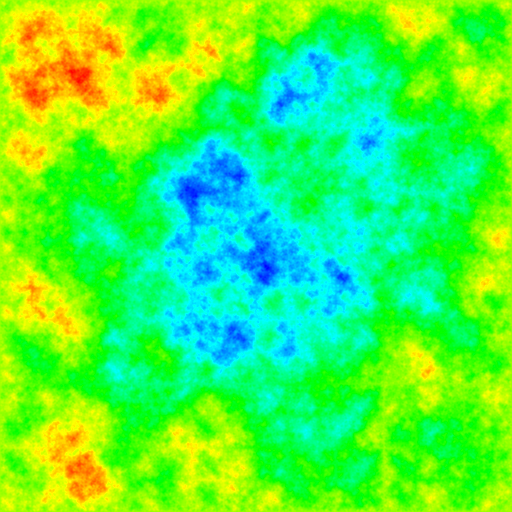
I think this is pretty neat.  It’s a smooth landscape that could easily look natural.  We can do even better by giving a bit of color.  I’ve done this using a simple color map as described on Stackoverflow.

Using a map generated from similar parameters, we get a much prettier colour.  If you squint a bit, imagine something it could be a natural scene right?


All the code for this is available on my GitHub profile, the diamond-square project.  Some fun extensions to this would be to create some animations, or actually render it in 3D with OpenGL.